> ## Documentation Index
> Fetch the complete documentation index at: https://docs.watt.ma/llms.txt
> Use this file to discover all available pages before exploring further.
# Payment and Prepaid Wallet on watt.ma
> Top up your watt.ma wallet in dirhams, manage your Visa, Mastercard, and CMI cards, and pay for charging sessions in one tap.
The watt.ma application works with a **prepaid wallet in dirhams (MAD)**. You top up your balance from the app, then each charging session is automatically debited at the end. This page covers wallet management, supported payment methods, and how tokenization works.
## Prepaid Wallet
Your wallet balance is visible at all times on the **Charge** screen and on your **Profile**.
* Currency: Moroccan dirham (MAD).
* Balance automatically debited at the end of each session, based on the power delivered and the station's pricing.
* Instant top-up from a saved payment method.
* Shortcuts offered: 50 MAD, 100 MAD, 200 MAD, 500 MAD, or a custom amount.
The wallet may display an initial demo balance when the app runs in **Mock Mode**. See the [Installation](/en/app-mobile/installation) page to disable this mode.
## Payment Methods
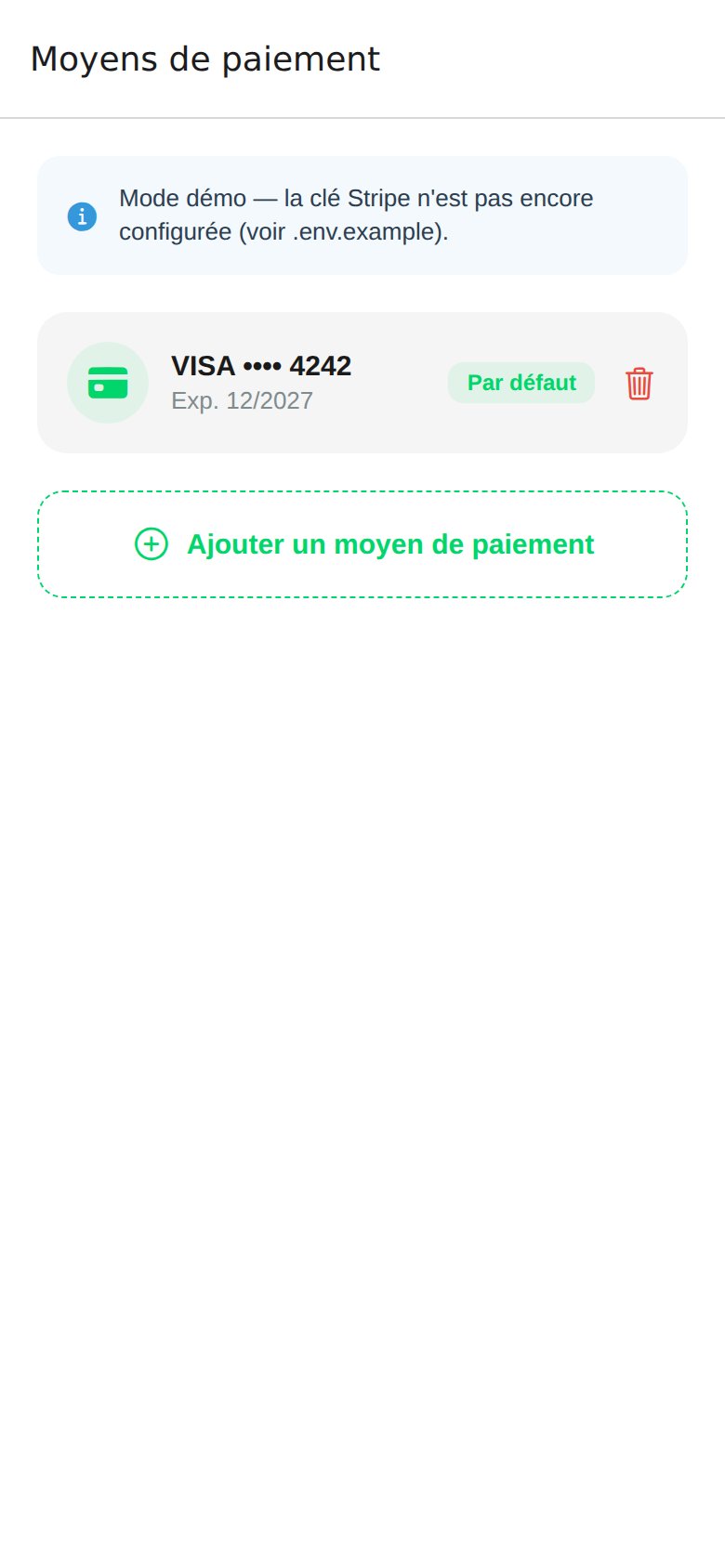 From **Profile → Payment Methods**, you can:
* Add a Visa or Mastercard.
* Set a default card for top-ups.
* Remove a saved card.
The app only displays the **last 4 digits** and the expiry date. The full card number is never stored on the device.
In Mock Mode, a demo card `VISA •••• 4242` is preloaded to test the flow without configuring Stripe.
## Tokenization and Security
* **Stripe**: tokenization of international cards via the Stripe client SDK. The Stripe key is provided by `EXPO_PUBLIC_STRIPE_PUBLISHABLE_KEY` and `STRIPE_SECRET_KEY` on the FastAPI backend.
* **CMI (Centre Monétique Interbancaire)**: integration planned for tokenization of locally issued Moroccan bank cards. See the [Roadmap](/roadmap).
* No card number is stored in MongoDB: only Stripe/CMI tokens and the last 4 digits are kept.
## Top Up the Wallet
From the **Charge** or **Profile** screen, tap the wallet balance.
Select a shortcut (50, 100, 200, 500 MAD) or enter a custom amount.
The app offers your default card. You can choose another or add a new one.
The balance is updated immediately after payment confirmation.
## Billing
* Each top-up and each session appears in the [Transaction History](/en/app-mobile/historique).
* PDF invoice export per session is **planned** (see the [Roadmap](/roadmap)).
* For corporate invoices, contact [contact@wattsc.com](mailto:contact@wattsc.com).
From **Profile → Payment Methods**, you can:
* Add a Visa or Mastercard.
* Set a default card for top-ups.
* Remove a saved card.
The app only displays the **last 4 digits** and the expiry date. The full card number is never stored on the device.
In Mock Mode, a demo card `VISA •••• 4242` is preloaded to test the flow without configuring Stripe.
## Tokenization and Security
* **Stripe**: tokenization of international cards via the Stripe client SDK. The Stripe key is provided by `EXPO_PUBLIC_STRIPE_PUBLISHABLE_KEY` and `STRIPE_SECRET_KEY` on the FastAPI backend.
* **CMI (Centre Monétique Interbancaire)**: integration planned for tokenization of locally issued Moroccan bank cards. See the [Roadmap](/roadmap).
* No card number is stored in MongoDB: only Stripe/CMI tokens and the last 4 digits are kept.
## Top Up the Wallet
From the **Charge** or **Profile** screen, tap the wallet balance.
Select a shortcut (50, 100, 200, 500 MAD) or enter a custom amount.
The app offers your default card. You can choose another or add a new one.
The balance is updated immediately after payment confirmation.
## Billing
* Each top-up and each session appears in the [Transaction History](/en/app-mobile/historique).
* PDF invoice export per session is **planned** (see the [Roadmap](/roadmap)).
* For corporate invoices, contact [contact@wattsc.com](mailto:contact@wattsc.com).